Smoother Client Communication: Create a Response Matrix
If you’ve ever felt swamped by client enquiries, struggling to find the key details buried in emails, or wondered why something you thought was obvious needs clarifying, you’re definitely not alone. Communication is at the heart of great working relationships. But, left unstructured, it quickly becomes the very thing that slows us down.
That’s where a Response Matrix comes in which is a simple but powerful tool to streamline how you and your clients communicate, save time, avoid confusion, and elevate professionalism. Let’s unpack how to build one and why it matters.
Why Communication Needs Structure
In a world where messages can bounce between email, WhatsApp, Slack and Microsoft Teams, keeping track of everything can feel like herding cats. It’s not just about speed, it’s also about clarity, consistency and mutual respect.
Professional VAs don’t just respond, they set the tone and take control of workflow in a way that works for both sides. Clear systems protect your time and make clients feel confident they’ll be heard and supported.
This isn’t about being rigid or unfriendly, it’s about creating expectations that make projects run smoothly.
What Is a Response Matrix?
A Response Matrix is a simple table you share with your clients that outlines:
Types of enquiries
Preferred communication channels
Expected response times
Escalation steps
Who’s responsible for what
Think of it as your communication playbook a tool that sets healthy boundaries and ensures everyone knows how and when things get done.
Step-by-Step: Build Your Response Matrix
1. List Common Enquiry Types
Start by thinking of the kinds of messages you get most often. For example:
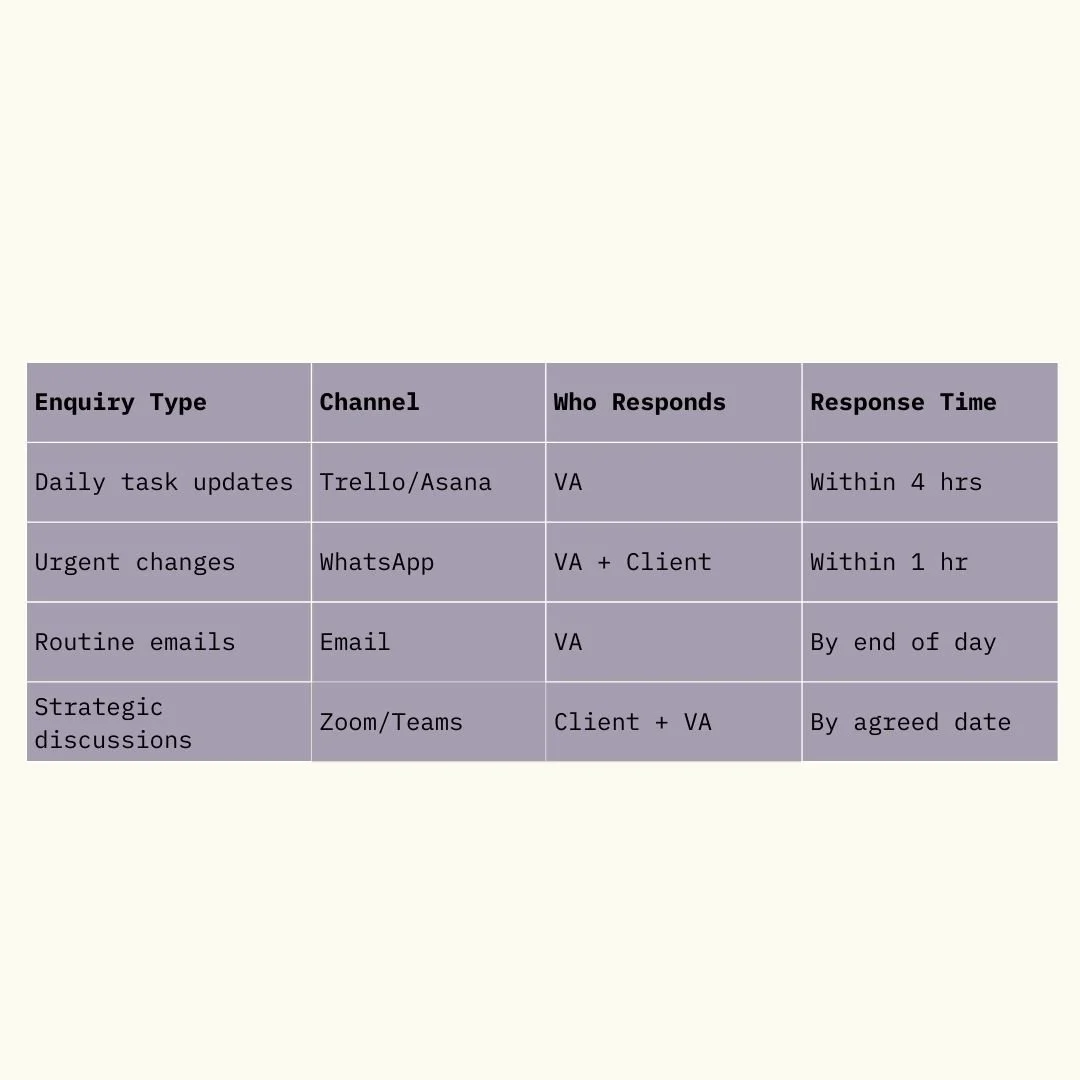
Example of a response matrix
Tailoring these categories helps avoid guesswork and ad-hoc decisions.
2. Set Clear Channels
It’s tempting to allow requests everywhere, but that’s how tasks slip through the cracks. Assign each type of communication to a specific tool:
Emails for routine updates and files
Project boards for task requests
Instant message for urgent issues
Video calls for strategic or complex chats
Setting the right channel keeps your inbox, and your brain, calmer.
3. Agree Response Times
No one minds waiting when they know what to expect. Define how quickly you’ll reply depending on urgency:
Routine tasks within 24 hours
Urgent queries within 2–4 hours
After-hours support clarifying when you’ll pick up tomorrow
This builds trust and prevents frustration on both sides.
4. Clarify Responsibilities
A great Response Matrix also shows who does what:
If a client emails a task, but you need more details, how and when do they provide them?
If something changes at short notice, who confirms the update?
Who approves final decisions?
This transparency prevents assumptions and misunderstandings.
Bonus Tips for Smoother Communication
Use Templates and SOPs
Standardised responses and Standard Operating Procedures (SOPs) help you reply faster without reinventing the wheel. This is especially useful for common questions or repetitive tasks.
Review & Tweak Regularly
A Response Matrix isn’t set in stone. After a few weeks, revisit it with your client and refine it based on real experience.
Be Human
Clarity doesn’t have to feel cold. Warmth, professionalism and a friendly tone go a long way in strengthening client relationships.
The Big Picture
Great communication isn’t accidental, it’s intentional. A Response Matrix gives you structure without stiffness, clarity without complexity and calm where there was once confusion.
Done well, it means fewer back‑and‑forths, more efficiency, and clients who feel looked after, which is exactly the kind of experience that keeps them coming back and recommending you to others.
After all, your time is precious, and a well‑structured day is a lot more enjoyable than one dominated by reactive firefighting.
Let’s talk less about what needs responding and more about how you can respond with confidence, clarity and calm.